What is OPETIA?
Cite OPETIA
You are kindly asked to cite the following paper when using OPETIA in your work:
OPETIA Publication in NeuroImage
Thank you!
OPETIA is a user-friendly PET/MRI (Positron Emission Tomography / Magnetic Resonance Imaging) image analysis software, developed using Python for accurate brain image quantification.
OPETIA can be run on: - Windows - Linux Ubuntu - MacOS
OPETIA provides:
Structural (MRI) image processing
Functional (PET) image processing (static or dynamic)
ROI analysis: to calculate SUVR and cortical volume for 115 ROIs
MRIcroGL: for converting DICOM images to nifty images, and also for visualization.
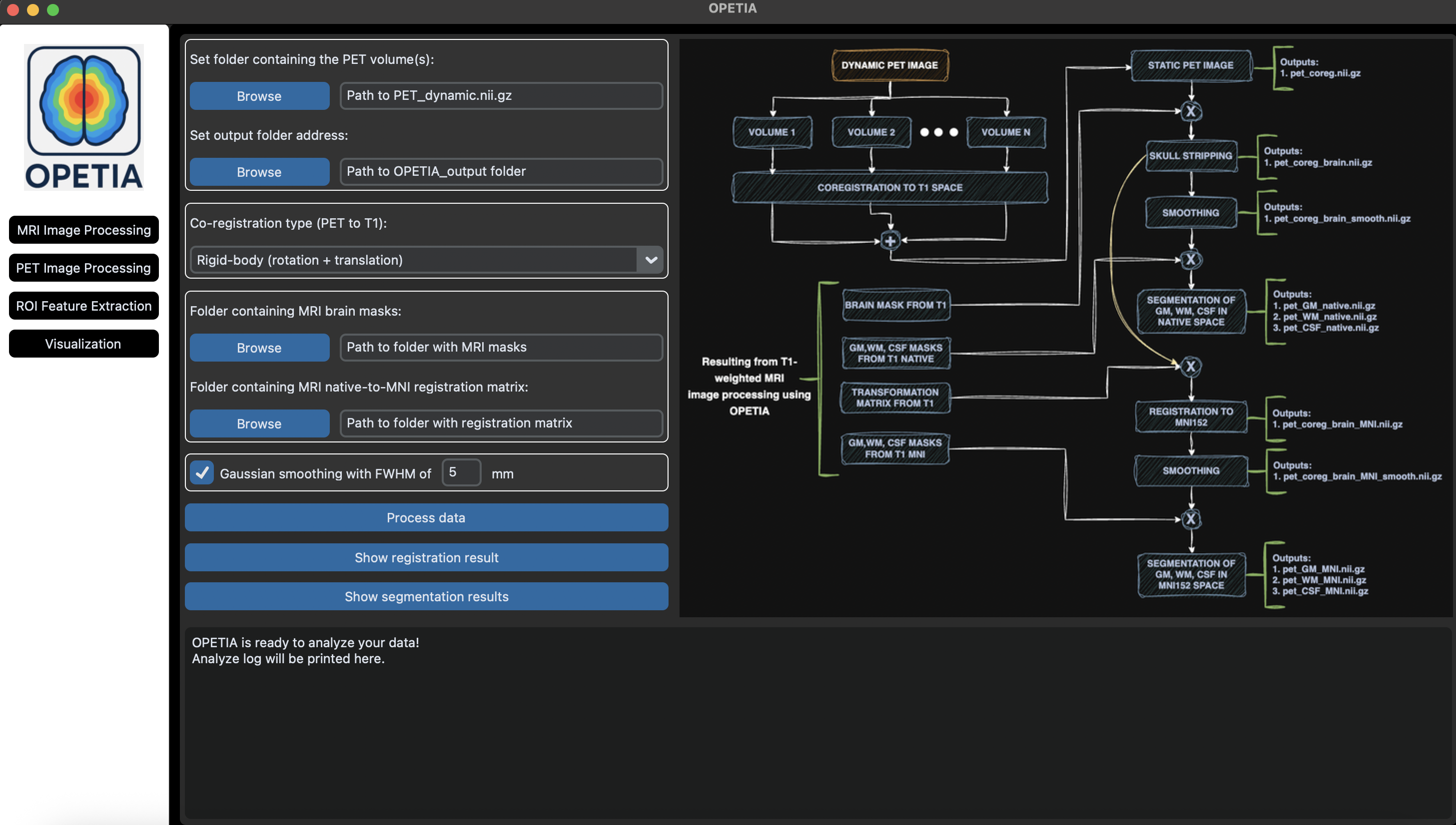
Every tool within OPETIA is provided with the flowchart of the data processing, including the input data and the output data. Additionally, the log box within OPETIA prints the data processing stages for monitoring and error handling.
Supporting Systems:
Windows 11
MacOS
Ubuntu
Input Data:
Static/dynamic PET image
T1-weighted/T2-weighted/Flair MRI image
Output Data:
Separate images for each ROI according to the Harvard-Oxford brain atlas (115 ROIs)
Standardized Uptake Value Ratio (SUVR) for 115 ROIs: mean, min, max
Cerebral Volume for 115 ROIs
OPETIA – New Release Highlights
The original FSL-based OPETIA used FSL functions for image pre-processing. The current version replaces FSL with ANTs and NiBabel to enable a standalone, cross-platform implementation. ANTs and NiBabel provide state-of-the-art algorithms for image registration and robust handling of neuroimaging data formats, and are widely adopted in the neuroimaging community. This transition removes external software dependencies, improves portability across operating systems, and facilitates reproducible deployment of the OPETIA pipeline.
Key new features in this release include:
Integrated Python-based neuroimaging libraries (ANTs, NiBabel) to support data processing aligned with the validated pipeline in the OPETIA publication.
Enabled cross-platform support, allowing OPETIA to run on Windows, macOS, and Ubuntu.
Added dedicated processing pipelines for dynamic PET imaging.
Unified the user experience by consolidating all tools into a single, consistent graphical user interface.
Integrated MRIcroGL for advanced image visualization, including built-in DICOM-to-NIfTI conversion.
Introduced a logging panel to display processing steps, execution status, and error messages in real time.
Added a visual flowchart of the data processing pipeline to improve transparency and user understanding.